
What is a Routing Guide? The Retail Vendor’s Survival Guide
Last Updated: Mar 22, 2026
Your retailer just sent you a 60-page PDF full of shipping rules and penalty schedules. This guide decodes routing guides in plain English: what they are, what each section means, and how to stay compliant without losing your mind.
In This Guide
What is a Routing Guide?
A routing guide is a retailer’s official document that spells out every rule a vendor must follow when shipping products to their distribution centers and stores. Think of it as the retailer’s shipping rulebook, covering approved carriers, delivery windows, packaging specifications, labeling requirements, and the penalties (chargebacks) for getting any of it wrong.
If you’re a D2C brand or first-time retail vendor, the routing guide is likely the single most important document you’ll receive during onboarding, and the one nobody warns you about. It typically arrives as a dense 30–100+ page PDF from your retail buyer or the vendor compliance team, and it contains everything from pallet height limits to the exact hour your truck must arrive at the receiving dock.
Every major retailer has their own routing guide, and no two are identical. Walmart’s routing guide has different rules than Target’s, which differs from Costco’s. If you supply multiple retailers, you need to track and comply with each one separately. Routing guide violations are one of the most common sources of retail chargebacks, making compliance not just a logistics detail, but a direct hit to your bottom line.
Key Facts
- ●What it is: A retailer’s shipping rulebook for vendors and suppliers
- ●Typical length: 30–100+ pages, updated quarterly or annually
- ●Covers: Carriers, delivery windows, packaging, labeling, documentation, and penalties
- ●Why it matters: Routing guide violations are among the most common sources of retail chargebacks
- ●Who needs one: Every vendor shipping to a major retailer (Walmart, Target, Costco, Amazon, Kroger, Home Depot)
Why Every Retailer Has a Routing Guide
Retailers operate massive distribution networks. A single Walmart distribution center might receive hundreds of truckloads per day from thousands of different vendors. Without standardized shipping rules, the receiving dock would descend into chaos: wrong pallet sizes that don’t fit the racking, shipments arriving without appointments blocking dock doors, and unlabeled cartons that can’t be scanned into inventory.
The routing guide exists to prevent this. By mandating exactly how every vendor must prepare, label, and deliver their shipments, retailers can automate their receiving process and keep their supply chains moving efficiently. From the vendor’s perspective, the routing guide is non-negotiable. You either comply or you pay chargebacks. And enough chargebacks can end the relationship entirely.
How Often Routing Guides Change
Routing guides are living documents. Most retailers update theirs at least once per year, and some make changes quarterly. Walmart, for example, updates its transportation routing guide annually and publishes the updated version through Retail Link. Target communicates updates through Partners Online.
The problem for vendors is that changes can be subtle (a new pallet height maximum, a shifted delivery window, a new labeling requirement) and buried deep in the document. Missing a single update can trigger chargebacks on every shipment until you catch it. This is why vendors who supply multiple retailers need a systematic way to track routing guide versions and changes.
The Key Sections of Every Routing Guide
While every retailer’s routing guide is different, they all cover the same core topics. Here’s what you’ll find in virtually every routing guide and what each section means for your operations.
Transportation Requirements
Approved carriers, freight class, mode of transport (LTL, truckload, parcel), and routing instructions. Many retailers operate "collect" programs where they arrange the freight. Others require the vendor to ship "prepaid" using an approved carrier list.
Watch for: Whether you are classified as Collect or Prepaid. Using a non-approved carrier on a Collect shipment is an instant chargeback.
Delivery Windows & Appointments
Receiving hours, appointment scheduling requirements, MABD (Must Arrive By Date) rules, and dock assignment procedures. Most retailers require appointments scheduled 24–48 hours in advance through their portal.
Watch for: Appointment lead times and the exact receiving hours for your specific DC. Arriving without an appointment often means a refused load.
Packaging Requirements
Pallet dimensions, maximum pallet height and weight, case pack configuration, stretch wrap specifications, corner boards, tier sheets, and pallet quality standards (GMA Grade A or B). Some retailers strongly discourage or restrict certain materials like styrofoam.
Watch for: DC-specific pallet height limits. A shipment that passes at one DC may be rejected at another.
Labeling Requirements
GS1-128 shipping labels, master carton labels, pallet labels, UPC/GTIN placement, and specific barcode quality minimums. Labels must be readable by automated scanners at the DC receiving dock.
Watch for: Label placement location (which face of the carton), barcode size minimums, and whether the retailer requires a specific label template.
Documentation & ASN
Bill of Lading (BOL) requirements, packing list format, EDI 856 ASN timing (must transmit before the freight arrives), and proof of delivery requirements. The ASN must match the physical shipment exactly.
Watch for: ASN transmission timing. Most retailers require the ASN sent before the truck leaves your dock. Sending it after departure or after arrival triggers chargebacks.
Penalties & Chargebacks
The chargeback schedule for each type of violation: late delivery, wrong carrier, ASN errors, labeling errors, pallet build violations, and documentation failures. This section tells you exactly what each mistake costs.
Watch for: Cumulative penalty clauses. Some retailers increase the chargeback rate for repeat offenders.
Important: Many routing guides have DC-specific requirements that override the general rules. A shipment to Walmart’s Bentonville DC may have different specifications than one to their Dallas DC. Always check for location-specific addenda or appendices.
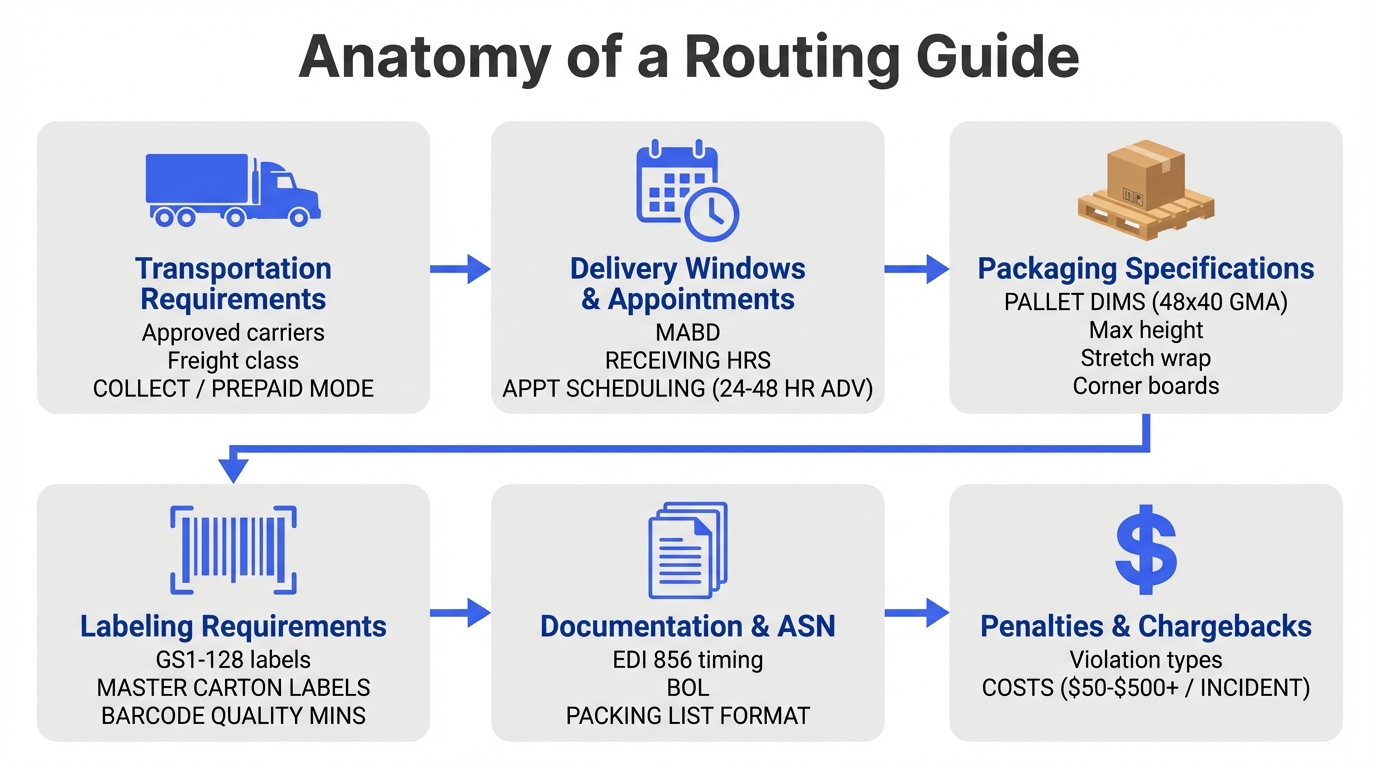
The labeling section typically references GS1-128 shipping labels and ASN (Advance Shipment Notification) requirements. The packaging section often includes retail-ready packaging and polybag and suffocation warning specifications. These are separate compliance topics with their own deep requirements. Our dedicated guides cover each in detail.
Must Arrive By Date (MABD) and OTIF Explained
Two terms you’ll see repeatedly in any routing guide are MABD and OTIF. Understanding these concepts is critical because they form the basis of how retailers measure your shipping performance, and determine your chargebacks.
What is MABD (Must Arrive By Date)?
The Must Arrive By Date (MABD) is the deadline by which your shipment must be delivered to the retailer’s distribution center or store. It’s not a suggestion. It’s a hard cutoff. Miss the MABD and you face chargebacks, regardless of whether the delay was caused by your warehouse, the carrier, or weather.
The MABD is typically calculated backward from the date the retailer needs the product on the shelf. The retailer factors in their own receiving, quality inspection, and distribution timelines. By the time the MABD reaches you, there’s no slack in the schedule.
A critical distinction: the MABD is a delivery date, not a ship date. It doesn’t matter when you put the order on the truck. It matters when the truck arrives at the DC. This means you need to build in transit time when planning your ship date. If the MABD is Friday and transit is three days, you need to ship by Tuesday at the latest.
What is OTIF (On Time In Full)?
OTIF stands for On Time In Full: a scorecard metric that measures what percentage of your orders arrive by the MABD (on time) with the correct quantities (in full). It’s the single most important vendor performance metric at most major retailers.
How OTIF is Calculated
On Time
Shipment arrives at the DC within the delivery window (on or before the MABD). Early deliveries without appointments may also be penalized.
In Full
The shipment contains the exact quantities ordered: no shorts (under-shipment) and no overages (over-shipment). Both count against you.
OTIF% = (Orders delivered on time AND in full) ÷ (Total orders) × 100
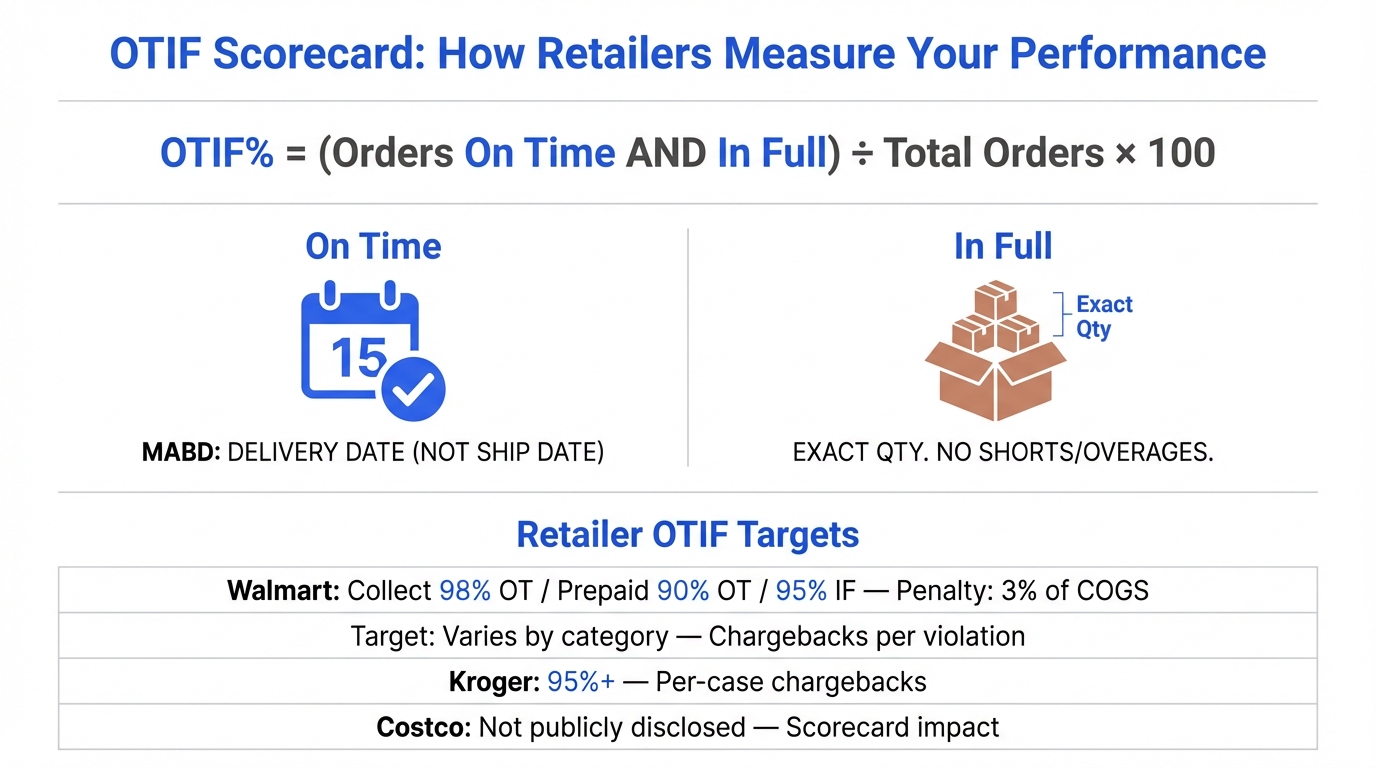
OTIF Targets by Retailer
Walmart pioneered OTIF enforcement in 2017 and remains the most aggressive. Other retailers have adopted similar programs with varying thresholds and penalty structures.
| Retailer | OTIF Target | Penalty Structure | Measurement Period |
|---|---|---|---|
| Walmart | 90% OT (Prepaid), 98% OT (Collect), 95% IF | 3% of COGS on non-compliant cases | Monthly, rolling |
| Target | 100% OTA goal, 100% OTS goal | 3% of COGS (min $150) for non-compliance | Quarterly scorecard |
| Costco | Not publicly disclosed | Vendor scorecard impact | Rolling |
| Amazon | Varies by program | Shortage claims, chargebacks | Continuous |
| Kroger | 95%+ | $100–$2,000 per violation type | Monthly |
OTIF scores are tracked on your vendor scorecard alongside other metrics like fill rate and case pack accuracy. Consistently low OTIF scores don’t just mean chargebacks. They can lead to reduced order volumes, loss of shelf space, or termination of the vendor relationship.
Routing Guide Requirements by Retailer
Each major retailer has unique routing guide requirements. Here’s what vendors need to know about the key differences between the biggest US retailers.
| Retailer | Shipping Model | Appointment System | Key Requirements |
|---|---|---|---|
| Walmart | Collect or Prepaid | Retail Link / TSCP 2.0 | OTIF 90-98%, ASN before delivery, GS1-128 labels, GMA-A pallets |
| Target | Collect or Prepaid | Ryder Online (RDC) / Docklink (FDC) | 100% OTA goal, 100% OTS goal, ASN required, vendor scorecard tracking |
| Costco | Collect or Prepaid | Email (2+ business days advance) | 52" max pallet height (dry goods), EPS discouraged, sustainability packaging rules |
| Amazon | Amazon-routed or Prepaid | Carrier Central | FC-specific routing, prep & packaging guidelines, carton labeling |
| Kroger | Collect or Prepaid | Kroger scheduling system | Temperature control (food/bev), approved carrier list, DC-specific hours |
Walmart
Walmart’s routing guide is one of the most detailed in the industry. Vendors must determine whether they are Collect (Walmart arranges and pays for freight) or Prepaid (vendor arranges and pays for freight). This classification affects carrier selection, appointment scheduling, and billing. Collect vendors use Walmart’s preferred carriers and schedule through Walmart’s transportation management system.
Walmart’s OTIF program is the strictest in retail. As of 2024, Walmart sets separate targets: 98% on-time for Collect shipments, 90% on-time for Prepaid shipments, and 95% in-full. Vendors who fall below these thresholds face fines of 3% of the cost of goods sold (COGS) on non-compliant cases. All shipments require EDI 856 ASNs transmitted before the freight arrives at the DC. Pallet specifications, GS1-128 labeling, and appointment scheduling through Retail Link are all mandatory.
Target
Target’s routing guide emphasizes carrier compliance and delivery scheduling. Vendors must use Target-approved carriers for collect shipments and schedule deliveries through Ryder Online (for regional DCs) or Docklink (for flow DCs). Target sets a 100% On Time Arrival (OTA) goal and a 96% On Time Shipment (OTS) target, with non-compliance penalties of 3% of COGS (minimum $150 per occurrence).
Costco
Costco’s routing guide is notable for its strict packaging requirements. Pallets must not exceed 48″ × 40″ and have a maximum height of 52″ (including the pallet). Costco strongly discourages styrofoam (EPS) packing materials (use requires specific buyer approval) and requires specific stretch wrap specifications. Vendors must also meet Costco’s sustainability packaging guidelines, which are updated regularly.
Amazon
Amazon’s inbound routing guide (for Vendor Central suppliers) covers prep and packaging requirements, carton labeling, and shipment creation through Vendor Central. Amazon uses a different model than traditional brick-and-mortar retailers. Shipments are often directed to specific fulfillment centers via Amazon’s routing system, and delivery appointments are managed through the Carrier Central portal.
Kroger
Kroger’s routing guide has additional temperature-control requirements for food and beverage vendors. Delivery appointments are managed through Kroger’s scheduling system, and vendors must comply with specific receiving window hours that vary by distribution center. Chargeback penalties range from $100 for packing list errors to $500 for missed appointments and up to $2,000 per item per division for poor pallet quality.
Common Routing Guide Violations and Their Costs
Routing guide violations result in chargebacks, deductions taken directly from your payment. Here are the most common violations and their typical costs.
Late Delivery (Missed MABD)
$200–$500+ per POShipment arrives after the Must Arrive By Date. The most common and most expensive violation at most retailers.
How to avoid: Build transit time buffers into your ship dates. Ship 1–2 days earlier than the minimum to account for delays.
Wrong or Unapproved Carrier
$150–$300 per shipmentUsing a carrier not on the retailer’s approved list, or shipping Prepaid when classified as Collect (or vice versa).
How to avoid: Verify your Collect/Prepaid status and use only approved carriers. Check carrier lists before each shipment.
ASN Errors
$100–$500 per shipmentASN not transmitted, transmitted late (after delivery), or data doesn’t match the physical shipment (wrong quantities, missing items, incorrect SSCC codes).
How to avoid: Automate ASN generation from your WMS. Transmit immediately after the truck leaves your dock. Verify SSCC codes match.
Pallet Build Violations
$50–$200 per palletPallet exceeds height limit, wrong pallet size, poor stretch wrap, missing corner boards, or using non-GMA pallets.
How to avoid: Post pallet specs at every build station. Use a height gauge. Train warehouse staff on each retailer’s requirements.
Labeling Errors
$50–$150 per carton/palletMissing GS1-128 labels, labels in the wrong position, unreadable barcodes, or missing/incorrect data fields.
How to avoid: Test barcode scannability before shipping. Verify label placement matches retailer specs. Use quality label stock.
No Appointment / Missed Appointment
Load refusal + redelivery costsArriving at the DC without a scheduled appointment or outside the appointment window. The retailer may refuse the load entirely.
How to avoid: Schedule appointments 24–48 hours in advance. Confirm appointment times with your carrier. Build in arrival buffers.
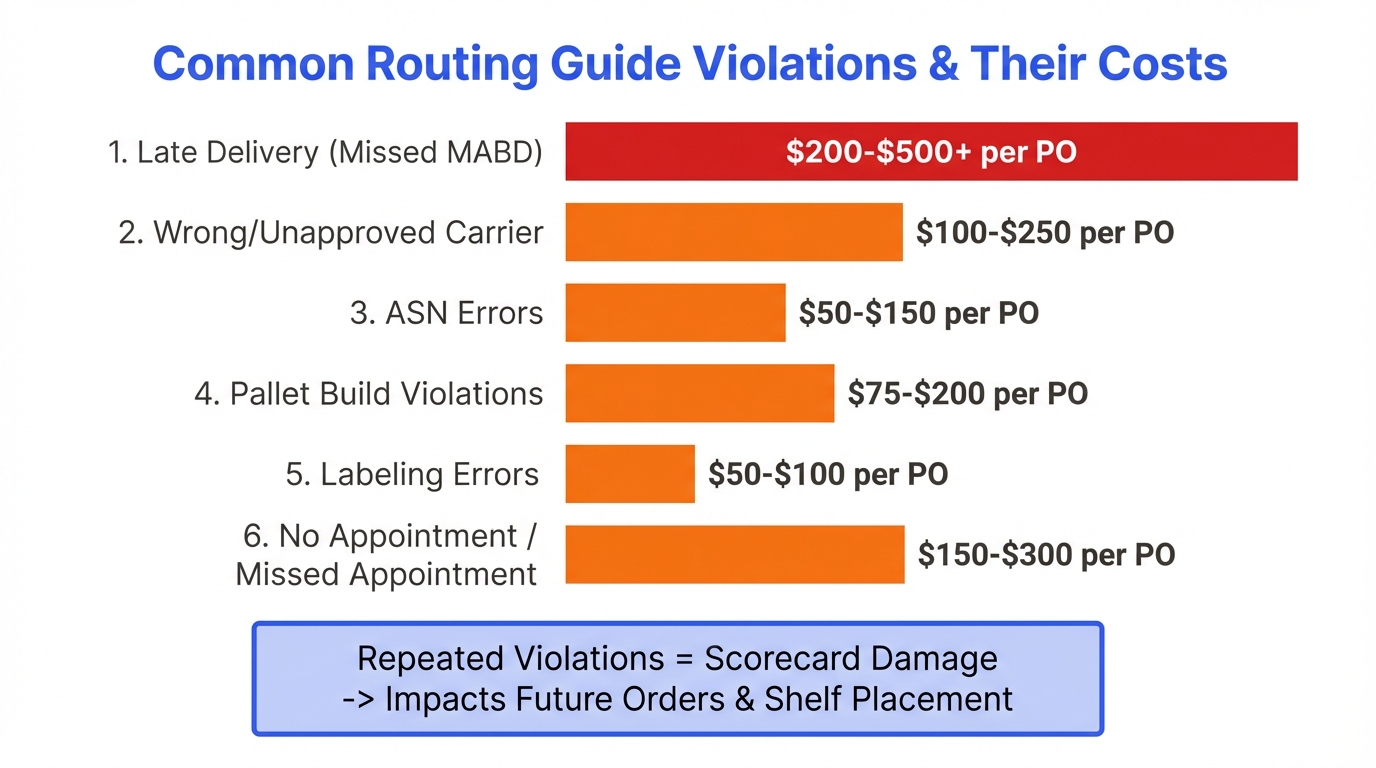
The real cost of violations: Beyond the direct chargeback amount, repeated violations damage your vendor scorecard, which affects order volumes, shelf placement, and your ongoing relationship with the buyer. A pattern of non-compliance can lead to the retailer reducing orders or dropping you entirely.
Stop guessing, start knowing
Not sure what your routing guide requires?
RetailerHub’s Compliance IQ lets you ask any compliance question and get instant answers, including carrier requirements, pallet specs, labeling rules, and OTIF thresholds for each retailer.
How to Read Your Routing Guide: A Practical Walkthrough
Opening a 60-page routing guide for the first time is overwhelming. Here’s a systematic approach to extracting the information you actually need.
Find your shipment classification
Are you Collect (retailer arranges freight) or Prepaid (you arrange freight)? This determines which sections of the routing guide apply to you. Some requirements only apply to one type.
Identify your DC-specific requirements
Many routing guides have appendices or addenda with rules specific to each distribution center. Find the DCs you ship to and note any requirements that differ from the general rules.
Note carrier and appointment rules
If you are Prepaid, identify the approved carrier list. Note appointment scheduling requirements, lead times, and receiving hours for your DCs.
Document packaging specifications
Record pallet dimensions, maximum height/weight, stretch wrap requirements, and any prohibited materials. Create a reference card for your warehouse team.
Map labeling requirements
Identify which labels are required (GS1-128, master carton, pallet), where they must be placed, and what data fields they must contain. Cross-reference with your current label setup.
Understand ASN and documentation rules
Note the ASN transmission deadline (before pickup? before delivery?), required data fields, and BOL/packing list format requirements.
Map the chargeback schedule
List every violation type and its cost. Prioritize the most expensive ones for your compliance focus. This becomes your risk register.
Pro tip: Create a one-page compliance cheat sheet for your warehouse team that summarizes the routing guide requirements for each retailer. Warehouse workers don’t need the full 60 pages. They need a quick reference for pallet specs, label placement, and carrier cutoff times. Build this into your warehouse SOPs.
Routing Guide Compliance Strategies
Compliance isn’t about memorizing 60 pages. It’s about building the routing guide requirements into your systems and processes so compliance happens automatically.
Build requirements into your SOPs
Don’t rely on people remembering the rules. Encode routing guide requirements into your standard operating procedures so warehouse staff follow them automatically.
Automate ASN generation
Connect your WMS to your EDI system so ASNs are generated and transmitted automatically when shipments leave the dock. Manual ASNs are error-prone and often late.
Use a TMS for carrier management
A Transportation Management System (TMS) enforces carrier compliance by only routing shipments through approved carriers and managing appointment scheduling.
Work with a retail-experienced 3PL
If you outsource fulfillment, choose a 3PL with proven retail compliance experience. They should already know your retailers’ routing guide requirements.
Schedule monthly routing guide reviews
Assign someone to check each retailer portal monthly for routing guide updates. Compare the latest version against your current compliance checklist.
Track compliance metrics
Monitor your OTIF scores, chargeback rates, and violation types. Identify patterns and address the root causes of recurring violations.
Automating ASN generation is one of the highest-impact compliance investments you can make. ASN errors (late, missing, or inaccurate) are among the most common routing guide violations, and they’re entirely preventable with the right systems.
If you’re using a 3PL, verify that they are familiar with your specific retailers’ routing guides. Not all 3PLs handle retail fulfillment, and the difference between a 3PL that knows Walmart’s routing guide and one that doesn’t can be thousands of dollars in chargebacks per quarter. Ask your 3PL which retailers they currently serve and request their chargeback rates as a reference.
Stop manually parsing 60-page routing guides. RetailerHub extracts every requirement automatically and alerts you when something changes. Ask Compliance IQ any question about your retailer’s shipping rules.
When Routing Guides Change (and They Will)
Routing guides are not static documents. Retailers update them regularly, sometimes with major structural changes, sometimes with small tweaks that are easy to miss but expensive to violate.
How Retailers Communicate Changes
Most retailers announce routing guide updates through their vendor portals (Retail Link, Partners Online, Vendor Hub). Some send email notifications to the vendor contact on file. The problem is that these notifications are easy to miss. They arrive alongside dozens of other portal alerts and operational emails. And in many cases, the retailer simply posts the updated PDF without a detailed changelog, leaving you to figure out what actually changed.
What Typically Changes
- ●OTIF thresholds: Retailers may raise the target percentage or increase penalty rates
- ●Carrier lists: Approved carriers are added, removed, or reclassified
- ●Packaging specifications: Pallet heights, stretch wrap requirements, or sustainability mandates
- ●Labeling requirements: New barcode formats, label placement rules, or data fields
- ●Delivery windows: Receiving hours, appointment scheduling rules, or seasonal adjustments
- ●Chargeback schedules: New violation categories or increased penalty amounts
How to Stay Current
The manual approach is to assign someone on your team to check each retailer portal monthly and compare the current routing guide PDF against the previous version. This works with one or two retailers, but becomes impractical when you supply five or more.
RetailerHub’s Version Intel feature tracks routing guide changes across all your retailers and highlights what’s new, so you don’t have to manually diff 60-page PDFs to find the one paragraph that changed. When a retailer updates their routing guide, you get an alert with the specific changes that affect your operations.
Routing Guide vs. Vendor Manual: What’s the Difference?
New vendors often confuse the routing guide with the vendor manual (also called the vendor compliance guide or supplier handbook). They’re related but distinct documents.
| Aspect | Routing Guide | Vendor Manual |
|---|---|---|
| Focus | Shipping and transportation logistics | Broad vendor requirements (product, packaging, labeling, EDI, compliance) |
| Covers | Carriers, delivery windows, pallet specs, freight rules | Product standards, marketing, labeling, EDI setup, financial terms |
| Update frequency | Quarterly to annually | Annually or as needed |
| Primary audience | Logistics, warehouse, and transportation teams | Entire vendor organization (sales, ops, finance, compliance) |
| Penalty focus | Shipping and delivery chargebacks | All chargeback types (product, packaging, labeling, shipping) |
In practice, some retailers combine both into a single document, while others keep them separate. Walmart, for example, publishes a comprehensive vendor manual that includes routing instructions. Target maintains separate documents for transportation routing and general vendor requirements. Regardless of format, you need to know and comply with both sets of requirements. For a deeper dive into the full vendor onboarding process, see our retail vendor onboarding guide.
Routing Guide Glossary
Routing guides are full of industry jargon. Here’s a quick reference for the terms you’ll encounter most often.
MABD
Must Arrive By Date. The deadline by which your shipment must be delivered to the retailer’s DC or store.
OTIF
On Time In Full. A scorecard metric measuring the percentage of orders delivered by the MABD with correct quantities.
Collect
A shipping arrangement where the retailer arranges and pays for freight from the vendor’s dock to the DC.
Prepaid
A shipping arrangement where the vendor arranges and pays for freight delivery to the retailer’s DC.
LTL
Less Than Truckload. A shipping mode for shipments that don’t fill an entire trailer (typically 1–10 pallets).
FTL/TL
Full Truckload. A shipping mode for shipments that fill an entire trailer (typically 20–26 pallets).
BOL
Bill of Lading. The legal shipping document that serves as a receipt and contract between the shipper and carrier.
ASN
Advance Ship Notice (EDI 856). An electronic notification sent before a shipment arrives, detailing contents and tracking.
GS1-128
A barcode standard used on shipping labels to encode SSCC codes, item numbers, quantities, and other supply chain data.
SSCC
Serial Shipping Container Code. A unique 18-digit identifier for each carton or pallet in a shipment.
GMA Pallet
Grocery Manufacturers Association standard pallet (48″ × 40″). Grade A is new or like-new; Grade B allows minor wear.
DC
Distribution Center. The retailer’s warehouse where vendor shipments are received, processed, and distributed to stores.
TMS
Transportation Management System. Software that manages freight operations including carrier selection, routing, and appointment scheduling.
Chargeback
A financial penalty deducted from the vendor’s payment for routing guide violations or other non-compliance.
COGS
Cost of Goods Sold. Used by some retailers (like Walmart) as the basis for calculating OTIF penalty amounts.
Dock Door
The loading/unloading bay at a DC where trucks are received. Appointment systems assign specific doors to specific shipments.
Frequently Asked Questions About Routing Guides
Never miss a routing guide requirement again
Brands and 3PLs use RetailerHub to instantly answer any retailer compliance question, generate warehouse-ready SOPs, and get alerted when routing guides change. Built by a former ShipBob Lead WMS Engineer with 10+ years in fulfillment.
Related Guides
What is an ASN?
Complete guide to advance shipment notifications, EDI 856, and SSCC labels.
Vendor PerformanceRetail Chargebacks
What they are, why they happen, and proven strategies to prevent them.
OperationsWarehouse SOP Template
Build compliant warehouse processes for receiving, picking, and shipping.