
GS1-128 Shipping Labels: The Complete Guide to SSCC Barcodes
Last Updated: Mar 20, 2026
Everything you need to know about GS1-128 barcodes, SSCC-18 labels, UCC-128 compliance, and retailer-specific labeling requirements. Learn how to create compliant shipping labels and avoid costly chargebacks.
This guide contains AI-generated content based on publicly available information and general industry knowledge. Always verify requirements directly with your retail trading partners.
In This Guide
What is a GS1-128 Barcode?
A GS1-128 barcode is a standardized barcode used in retail and logistics to encode structured shipping data (including Serial Shipping Container Codes (SSCCs), purchase order numbers, dates, quantities, and more) on carton and pallet labels.
Previously known as UCC-128 or EAN-128, the GS1-128 barcode is built on the Code 128 symbology but adds a critical feature: Application Identifiers (AIs) that tell scanning systems exactly what type of data is encoded. This is what makes a GS1-128 barcode different from a standard Code 128. It’s not just a barcode, it’s a structured data carrier.
Every major retailer (Walmart, Amazon, Target, Home Depot, and Kroger) requires GS1-128 barcodes on shipping labels. The SSCC-18 encoded in the GS1-128 barcode is what links the physical carton or pallet to the electronic Advance Shipment Notification (ASN), enabling automated receiving at the distribution center.
The retailer-specific requirements in this guide are sourced from our analysis of publicly available retailer compliance information, including requirements published by Walmart, Target, Home Depot, and Kroger. This content is for general educational purposes. Always verify current requirements directly with your retail trading partners.
Key Facts
- ●Also known as: UCC-128, EAN-128, UCC/EAN-128, GS1-128 shipping label
- ●Based on: Code 128 symbology with GS1 Application Identifiers
- ●Primary use: SSCC-18 barcodes on shipping and pallet labels
- ●Required by: Walmart, Amazon, Target, Home Depot, Kroger, and most major retailers
- ●Standard label size: 4″ × 6″ (101.6 mm × 152.4 mm)
GS1-128 vs Code 128 vs ITF-14
One of the most common mistakes in shipping label compliance is using the wrong barcode type. GS1-128, Code 128, and ITF-14 look similar but serve very different purposes. Here is how they compare:
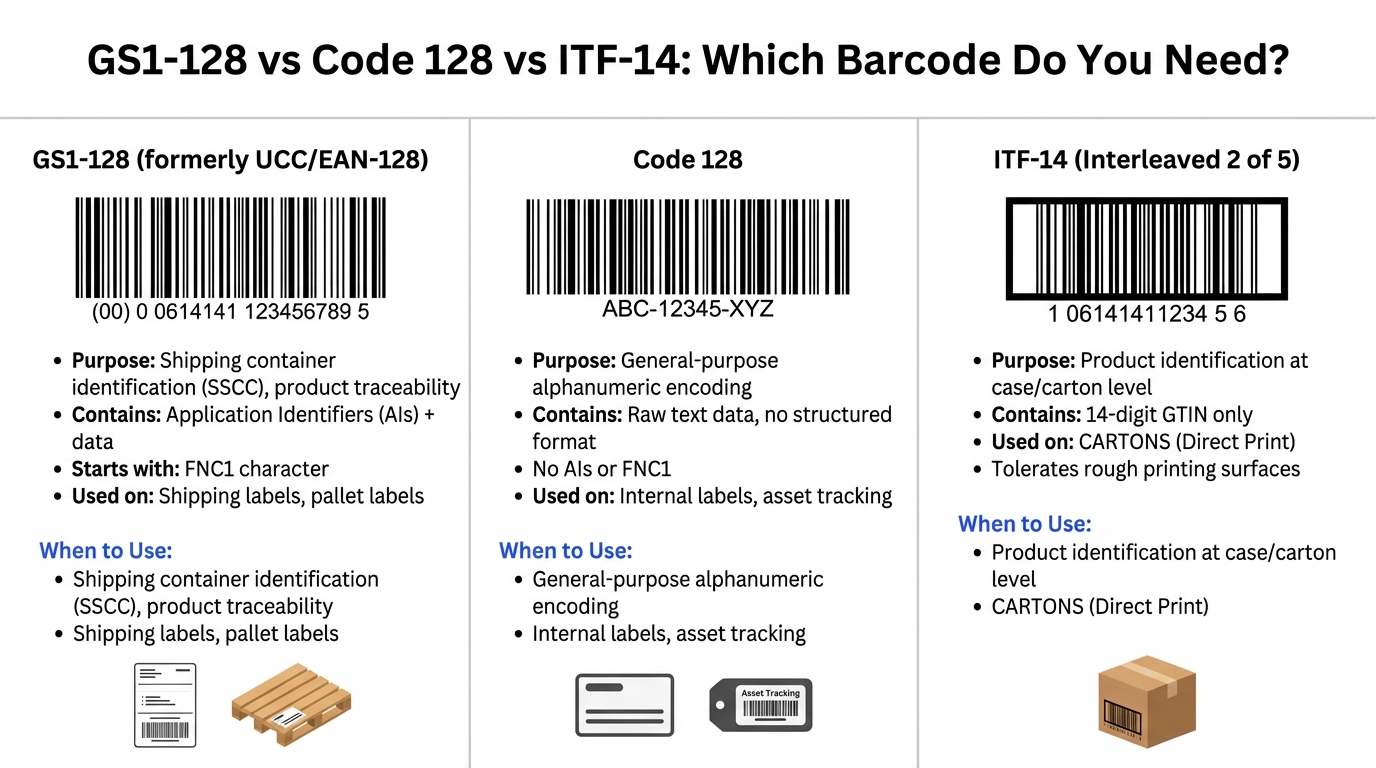
| Feature | GS1-128 | Code 128 | ITF-14 |
|---|---|---|---|
| Symbology | Code 128 + FNC1 after start | Code 128 | Interleaved 2 of 5 |
| Purpose | Shipping container ID (SSCC), traceability | General-purpose encoding | Case/carton product ID (GTIN) |
| Data Structure | Application Identifiers + structured data | Raw text, no structure | 14-digit GTIN only |
| Key Identifier | FNC1 after start character | No FNC1 | Bearer bars (thick border) |
| Used On | Shipping labels, pallet labels | Internal labels, asset tags | Corrugated cartons (direct print) |
| Print Surface | Label stock (pressure-sensitive) | Any surface | Corrugated board (tolerates rough surfaces) |
| Required by Retailers | Yes, all major retailers | No (internal use) | Yes, for case-level GTIN |
Common mistake: Using a standard Code 128 barcode instead of GS1-128. Both use the same symbology, but GS1-128 includes an FNC1 character immediately after the start code that tells scanners to interpret the data using Application Identifiers. Without FNC1, your SSCC barcode will scan as raw text and fail automated receiving.
Anatomy of a GS1-128 Shipping Label
A compliant GS1-128 shipping label follows a standardized zone layout. Each zone contains specific information that the retailer’s receiving system needs to process the shipment. The standard label size is 4″ × 6″ with the SSCC-18 barcode prominently displayed at the bottom.
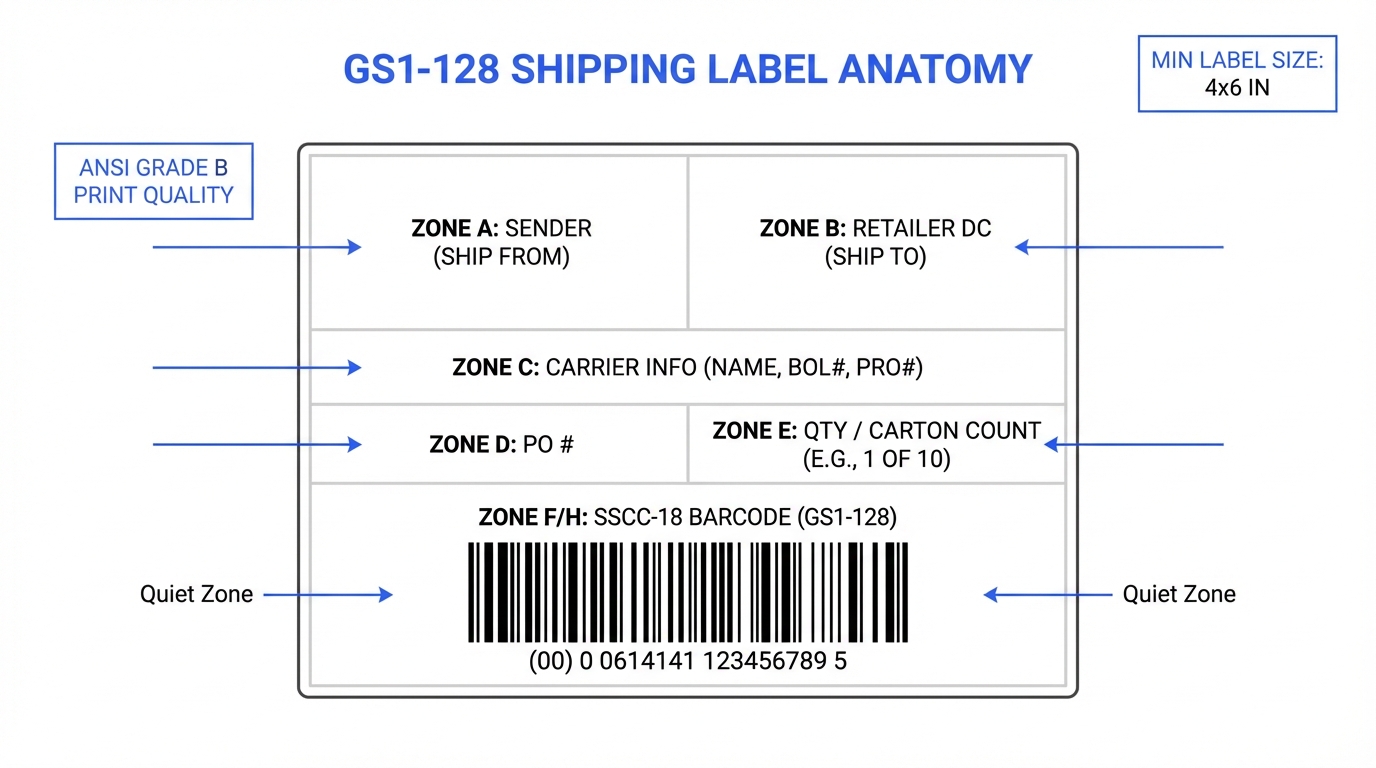
| Zone | Content | Details |
|---|---|---|
| Zone A | Ship From | Supplier’s company name and full address |
| Zone B | Ship To | Retailer’s DC name, address, and DC number |
| Zone C | Carrier Info | Carrier name, BOL number, PRO number |
| Zone D | PO Number | Retailer’s purchase order reference |
| Zone E | Quantity / Carton Count | Number of units and carton tally (e.g., 1 of 10) |
| Zone F/H | SSCC-18 Barcode | GS1-128 barcode encoding the 18-digit SSCC with AI (00) |
GS1-128 Application Identifiers Explained
Application Identifiers (AIs) are the key feature that distinguishes GS1-128 from standard Code 128. Each AI is a numeric prefix (shown in parentheses) that tells the scanning system what type of data follows and how many characters to expect.
For example, AI (00) means “the next 18 digits are an SSCC,” while AI (01) means “the next 14 digits are a GTIN.” This structured format allows a single barcode to carry multiple data elements.
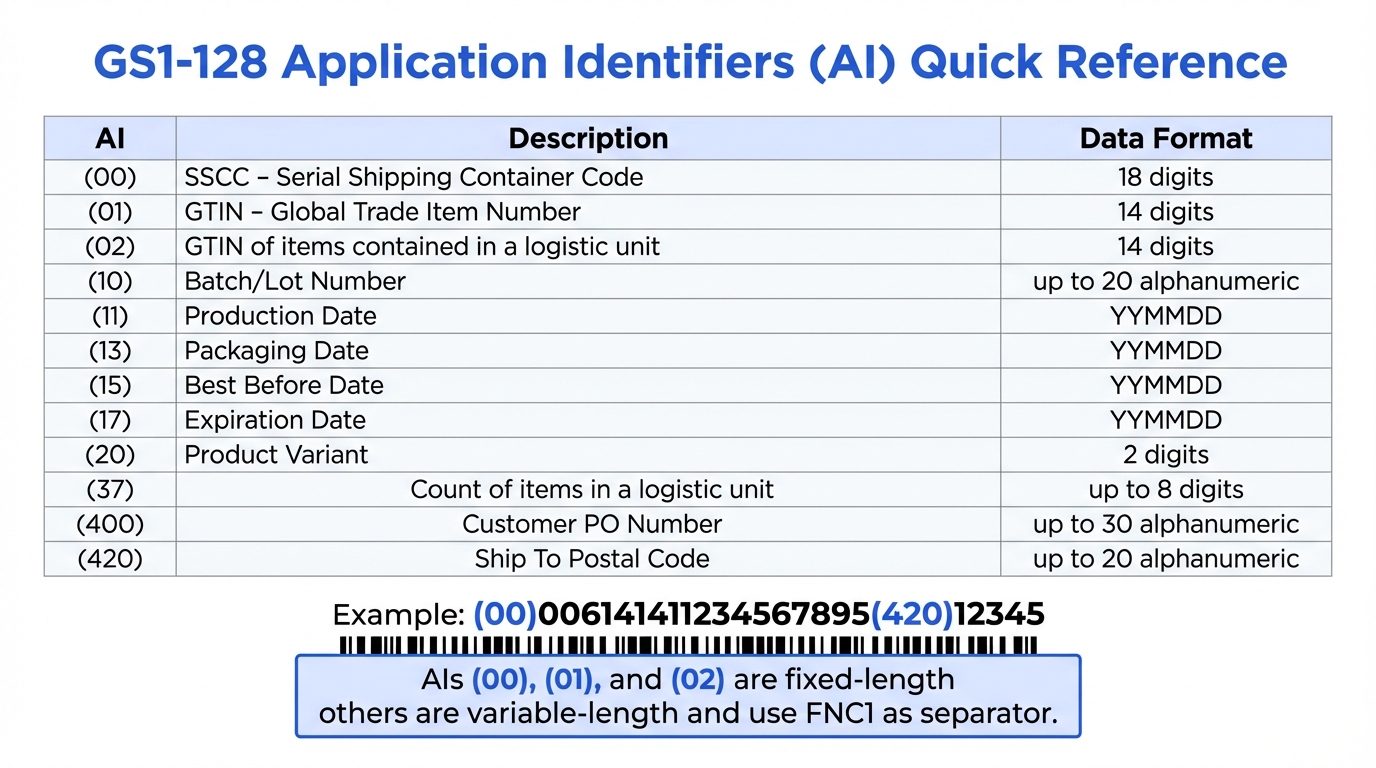
| AI | Description | Data Format | Length |
|---|---|---|---|
| (00) | SSCC: Serial Shipping Container Code | N18 | Fixed (18 digits) |
| (01) | GTIN: Global Trade Item Number | N14 | Fixed (14 digits) |
| (02) | GTIN of items in a logistic unit | N14 | Fixed (14 digits) |
| (10) | Batch / Lot Number | X..20 | Variable (up to 20) |
| (11) | Production Date | N6 (YYMMDD) | Fixed (6 digits) |
| (15) | Best Before Date | N6 (YYMMDD) | Fixed (6 digits) |
| (17) | Expiration Date | N6 (YYMMDD) | Fixed (6 digits) |
| (20) | Product Variant | N2 | Fixed (2 digits) |
| (37) | Count of items in a logistic unit | N..8 | Variable (up to 8) |
| (400) | Customer Purchase Order Number | X..30 | Variable (up to 30) |
| (420) | Ship-To Postal Code | X..20 | Variable (up to 20) |
Fixed vs variable length: AIs (00), (01), (02), (11), (15), (17), and (20) have fixed-length data fields. Variable-length AIs require a FNC1 separator character (or group separator, ASCII 29) between data elements when multiple AIs are encoded in a single barcode. The parentheses around AIs are for human readability only. They are not encoded in the barcode itself.
SSCC-18: The Serial Shipping Container Code
The SSCC-18 (Serial Shipping Container Code) is an 18-digit number that uniquely identifies every shipping container (carton, case, or pallet) in the global supply chain. It is the most common data element encoded in GS1-128 barcodes on shipping labels, always using Application Identifier (00).
The SSCC is what links the physical shipping container to the electronic ASN (EDI 856). When the shipment arrives at the retailer’s distribution center, dock workers scan the SSCC barcode. The warehouse management system automatically matches it to the ASN data, verifying contents without opening the carton. A mismatched or unreadable SSCC means the carton cannot be received electronically.
SSCC-18 Format Breakdown
Get a GS1 Company Prefix
You need a GS1 company prefix to generate SSCCs. Apply through GS1 US (gs1us.org). Prefix length varies from 7–10 digits for SSCC use.
Choose an Extension Digit
The first digit (0–9) is chosen by the company. Most companies use 0. It extends the available serial number range.
Assign Serial References
The serial reference fills the remaining digits between the company prefix and check digit. Each SSCC must be globally unique.
Calculate the Check Digit
Use the GS1 Mod 10 algorithm on the first 17 digits to calculate the 18th digit. Never manually assign the check digit.
Never Reuse an SSCC
Each SSCC should not be reused for at least 12 months. GS1 recommends treating them as permanently unique.
Link SSCC to ASN
The same SSCC on the physical label must appear in the EDI 856 ASN. This is what enables automated receiving.
GS1-128 Label Requirements by Retailer
Every retailer sets their own rules for GS1-128 label size, barcode placement, print quality, and required data fields. Here is a detailed comparison across five major US retailers based on their official compliance documentation:
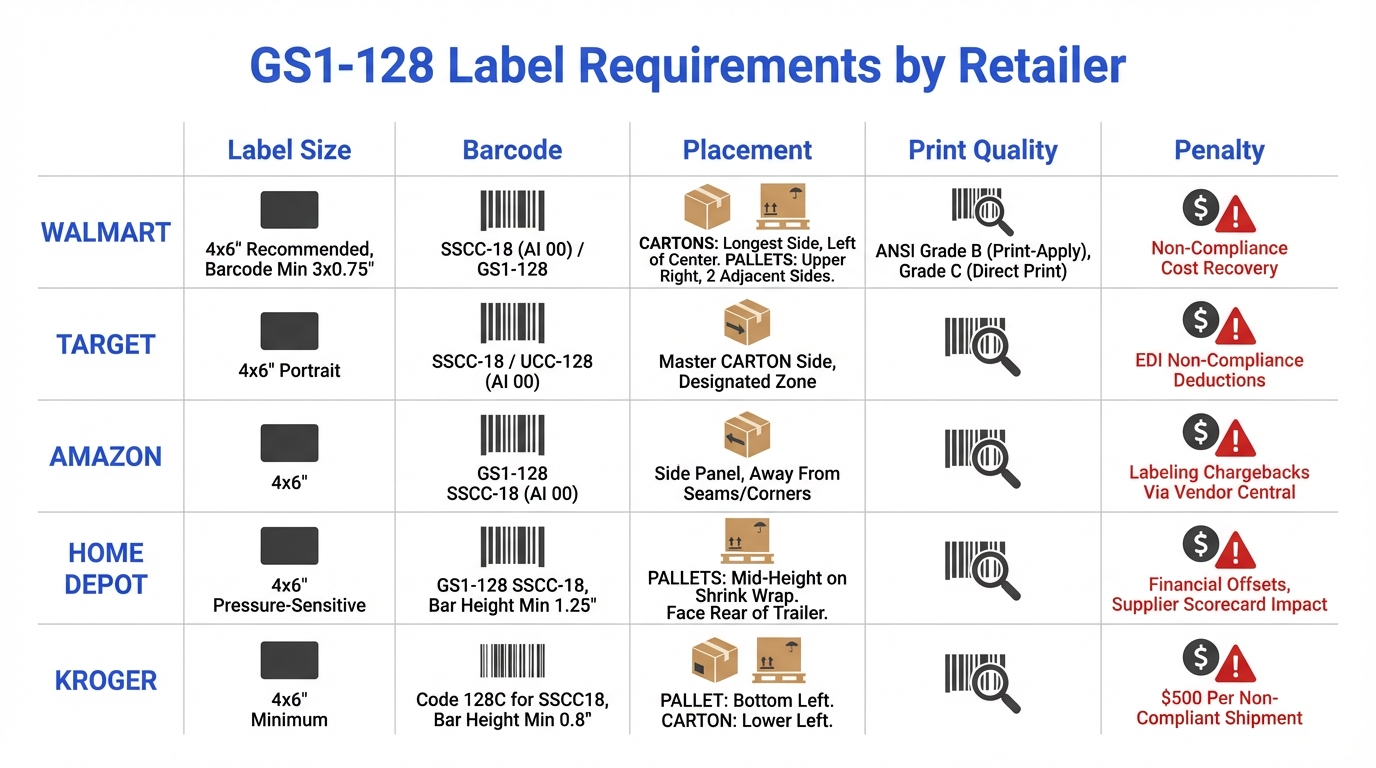
Walmart
Label Size
4″ × 6″ recommended; GS1-128 barcode minimum 3″ L × 0.75″ H
Barcode Format
SSCC-18 with AI (00) in GS1-128 format
Carton Placement
Left of center on longest side, ≥0.75″ from edge, ≥1.25″ from bottom
Pallet Placement
Upper right corner on at least 2 adjacent sides, between stretch wrap layers
Print Quality
ANSI Grade B (print-and-apply), Grade C (direct print on corrugate)
Penalty
Non-Compliance Cost Recovery Program: shipment may not be received without valid label
Source: Walmart Supply Chain Standards 2023 (rev. 04/05/2023), pp. 43–51
Target
Label Size
4″ × 6″, portrait orientation
Barcode Format
SSCC-18 / UCC-128 with AI (00)
Carton Placement
Side of master carton in designated label zone
Pallet Placement
GS1-128 label represents one pallet; placed per shipping label guidelines
Print Quality
Must be scannable; 10–16 pt font for barcode zone
Penalty
EDI non-compliance deductions; chargeback dispute process available
Source: Target GS1-128 Shipping Label Guidelines; SSCC-18/UCC-128 Carton Label Guidelines
Amazon
Label Size
4″ × 6″; quiet zone ≥0.25″ sides, ≥0.125″ top/bottom
Barcode Format
GS1-128 SSCC-18 with AI (00); X-dimension 0.020″, bar height ≥1.00″
Carton Placement
Side panel, away from seams and corners; do not cover with tape or straps
Pallet Placement
Per Vendor Central shipment preparation requirements
Print Quality
Must be scannable; module width 0.020″ (0.508 mm)
Penalty
Labeling chargebacks via Vendor Central for non-scannable or misplaced labels
Source: Amazon North American Vendor Shipment Preparation & Receive Manual (rev. 07/2021)
Home Depot
Label Size
4″ × 6″ pressure-sensitive white label with black ink
Barcode Format
GS1-128 SSCC-18; bar height ≥1.25″, X-dimension 0.020″–0.025″
Carton Placement
Carton label with zones A–H; box tally and carton contents required
Pallet Placement
Mid-height on outside of shrink wrap; face rear of trailer; pallets <3 ft: top of pallet
Print Quality
Quiet zone ≥10× X-dimension or 0.25″ minimum
Penalty
Financial offsets for non-compliance; label compliance tracked on Supplier Scorecard
Source: Home Depot Barcode Specifications (rev. 04/2017); RDC Supplier Requirements Guide (rev. 04/2022)
Kroger
Label Size
4″ × 6″ minimum; pressure-sensitive white with black print
Barcode Format
Code 128C for SSCC-18; bar height ≥0.8″
Carton Placement
Lower left corner of narrow side for smaller cartons
Pallet Placement
Bottom left of pallet; must scan through stretch wrap
Print Quality
Maximum contrast; must be scannable under stretch wrap
Penalty
$500 per non-compliant shipment; fee deductions under Standard Vendor Agreement
Source: Kroger Manufacturing Shipping Container Labeling Requirements (rev. 02/2018)
Last verified: March 2026 · Based on publicly available retailer compliance information
Note: Label requirements change frequently. Always confirm current specifications directly with each retailer’s vendor compliance team before shipping. Browse retailer-specific guidelines →
Label Placement and Sizing Rules
Correct label placement is critical for automated scanning at the receiving dock. A perfectly printed barcode is useless if it’s in the wrong location, covered by tape, or wrapped around a carton edge. Here are the universal rules that apply across most retailers:
Keep Away from Edges
Place the barcode at least 0.75″ from any vertical edge and 1.25″ from the bottom of the carton to prevent damage during handling.
Avoid Seams and Tape
Never place labels on carton seams, under packing tape, or where strapping will cross. This makes the barcode unreadable.
Flat Surface Only
Labels must be on a flat panel, never wrapping around an edge or on a curved surface. The barcode must lie completely flat to scan.
Between Stretch Wrap Layers
For pallets, apply the label between layers of stretch wrap so it is protected but still scannable through the outer layer.
Two Sides for Pallets
Most retailers require pallet labels on at least two adjacent sides so the label is visible regardless of how the pallet is oriented on the dock.
Human-Readable Text Below
Always include the SSCC number in human-readable text below the barcode as a fallback if the barcode cannot be scanned.
GS1-128 Barcode Physical Specifications
GS1 Min Bar Height
1.25″
31.75 mm (some retailers allow 0.75″)
Typical Min Width
3.0″
76.2 mm (varies by data)
Quiet Zone
≥ 10× X-dim
typically 0.20″–0.25″
X-Dimension
0.020″
0.508 mm (recommended)
Common GS1-128 Labeling Errors and Chargebacks
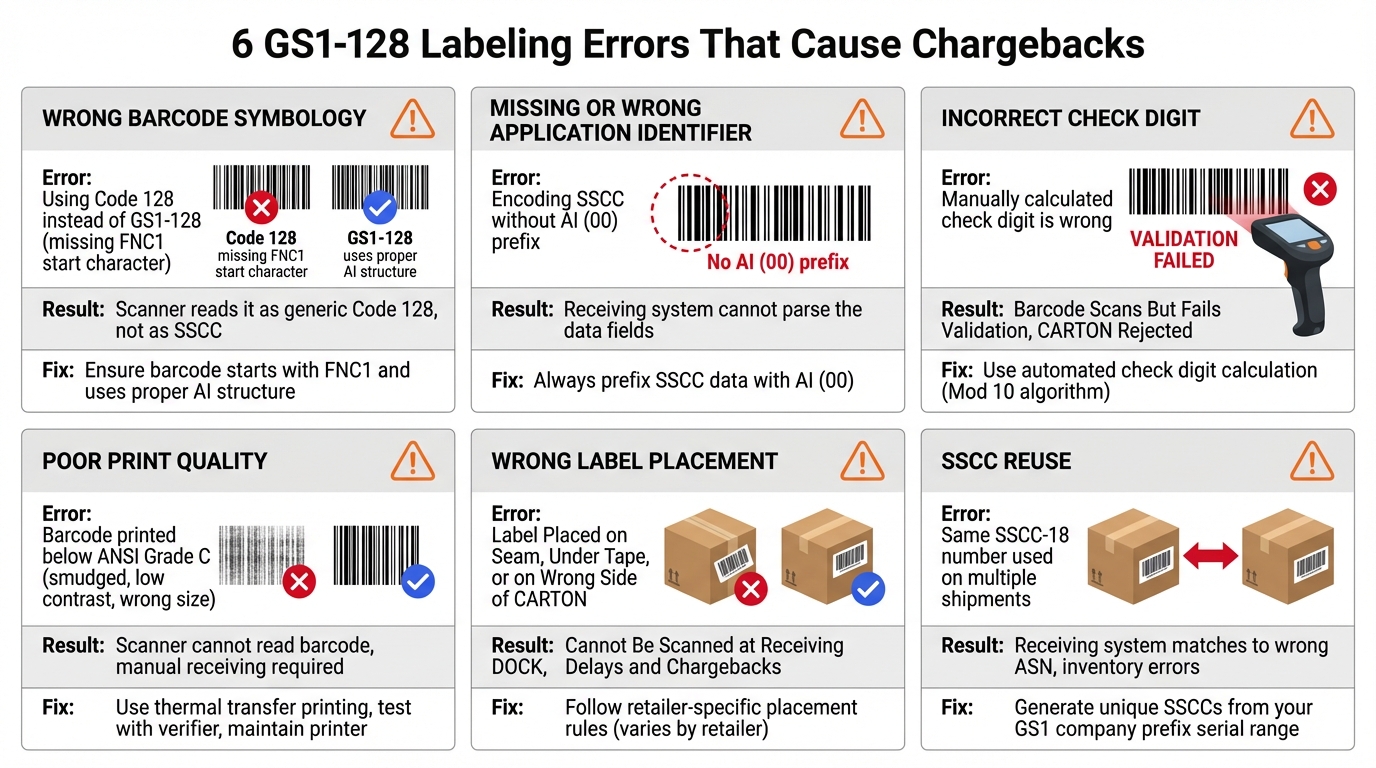
GS1-128 labeling errors are among the most common, and most preventable, causes of chargebacks in retail supply chains. Each error below can result in carton rejection, receiving delays, and financial penalties:
Error
Using standard Code 128 instead of GS1-128 (missing FNC1 start character).
Result
Scanner reads raw text instead of structured SSCC data. Automated receiving fails.
Prevention
Ensure your barcode software generates GS1-128 with FNC1, not plain Code 128.
Error
Encoding the SSCC number without the AI (00) prefix.
Result
Receiving system cannot identify the data as an SSCC. Carton is rejected or manually processed.
Prevention
Always include AI (00) before the 18-digit SSCC in the barcode data.
Error
Manually calculating or hardcoding the wrong check digit (18th digit of SSCC).
Result
Barcode scans but fails Mod 10 validation. Carton rejected at receiving.
Prevention
Use automated Mod 10 check digit calculation in your WMS or label software.
Error
Barcode printed below ANSI Grade C: smudged, low contrast, bars too narrow, or insufficient quiet zone.
Result
Scanner cannot read the barcode. Manual receiving required, delays and chargebacks.
Prevention
Use thermal transfer printing, verify with a barcode verifier, and maintain print heads regularly.
Error
Label placed on seam, under tape, around an edge, or on the wrong side of the carton.
Result
Barcode cannot be scanned at the receiving dock. Delays and potential chargebacks.
Prevention
Follow each retailer’s specific placement rules. When in doubt: flat surface, away from edges.
Error
Same SSCC-18 number reused on a different shipment before the 12-month minimum gap.
Result
Receiving system matches the barcode to the wrong ASN, causing inventory errors and disputes.
Prevention
Generate unique SSCCs from your GS1 company prefix serial range. Never recycle SSCC numbers.
Stop guessing, start knowing
Not sure if your labels meet retailer specs?
RetailerHub’s Compliance IQ lets you ask any labeling question, such as “What bar height does Kroger require?” or “Where does Target want the SSCC label placed?” Then get instant, accurate answers.
How to Generate GS1-128 Labels
There are several ways to generate compliant GS1-128 shipping labels, depending on your shipping volume and systems. Here is an overview of the most common approaches:
Your warehouse management system or ERP generates SSCC numbers and prints GS1-128 labels as part of the pick-and-pack workflow. Labels and ASN data are created from the same system, eliminating mismatches.
Best for: High-volume shippers with established WMS (SAP, Oracle, Manhattan, etc.)
Standalone label design software like BarTender, NiceLabel, or ZebraDesigner can create GS1-128 labels with proper AI formatting and Mod 10 check digit calculation.
Best for: Mid-volume shippers who need design flexibility
Many EDI providers (SPS Commerce, TrueCommerce, Cleo) offer integrated label generation as part of their ASN/EDI 856 workflow.
Best for: Companies already using an EDI provider for ASN transmission
Free and paid online tools can generate individual GS1-128 barcodes for testing or low-volume use. Not suitable for production shipping.
Best for: Testing and prototyping only
SSCC-18 Check Digit Calculation (Mod 10)
The 18th digit of the SSCC is a check digit calculated using the GS1 Mod 10 algorithm. This is the same algorithm used for UPC, EAN, and GTIN check digits:
- Starting from the right, assign alternating weights of 3 and 1 to each digit
- Multiply each digit by its weight
- Sum all the products
- Find the nearest multiple of 10 greater than or equal to the sum
- Check digit = nearest multiple of 10 − sum
Need a label SOP for your warehouse team? RetailerHub’s Instant SOPs generate step-by-step labeling procedures customized for each retailer account, so your dock team always knows the exact specs. See plans →
Frequently Asked Questions
What is a GS1-128 barcode?
A GS1-128 barcode is a standardized barcode symbology used on shipping labels to encode structured data like Serial Shipping Container Codes (SSCCs), GTINs, dates, and purchase order numbers. It is based on Code 128 but adds Application Identifiers (AIs) that tell scanners how to interpret the encoded data. It was previously known as UCC-128 or EAN-128.
What is the difference between GS1-128 and UCC-128?
GS1-128 and UCC-128 are the same thing. UCC-128 was the original name used in North America, while EAN-128 was used internationally. In 2005, GS1 unified the naming under "GS1-128." If a retailer’s compliance guide references UCC-128 labels, they mean GS1-128.
What is the difference between GS1-128 and Code 128?
Both use the same barcode symbology, but GS1-128 adds a FNC1 (Function Code 1) character at the start that tells scanners to interpret the data using GS1 Application Identifiers. Standard Code 128 encodes raw text without any structured meaning. You cannot use a plain Code 128 barcode as a GS1-128. The FNC1 character is required.
What is an SSCC-18?
SSCC-18 stands for Serial Shipping Container Code, an 18-digit number that uniquely identifies a shipping container (carton or pallet). It is encoded in a GS1-128 barcode using Application Identifier (00). The SSCC links the physical container to the electronic ASN, enabling automated receiving at the retailer’s distribution center.
What size should a GS1-128 shipping label be?
The standard size is 4 inches × 6 inches (101.6 mm × 152.4 mm). The GS1 standard minimum bar height is 1.25 inches (31.75 mm), though some retailers like Walmart allow 0.75 inches. Quiet zones must be at least 10 times the X-dimension on each side. Check each retailer’s specific barcode specs. For example, Kroger requires 0.8 inches and Amazon requires 1.00 inch minimum bar height.
Where should I place a GS1-128 label on a carton?
Placement varies by retailer. The general rule is: place the label on a flat surface on the side of the carton, away from edges, seams, and tape. Walmart requires left of center on the longest side. Amazon requires the side panel away from seams. For pallets, most retailers require labels on at least two adjacent sides.
What is an Application Identifier (AI)?
An Application Identifier is a numeric prefix in a GS1-128 barcode that identifies the type and format of the data that follows. For example, AI (00) means the next 18 digits are an SSCC, AI (01) means the next 14 digits are a GTIN, and AI (17) means the next 6 digits are an expiration date in YYMMDD format. AIs are shown in parentheses for human readability but are not encoded as parentheses in the barcode.
What happens if my GS1-128 label is non-compliant?
Non-compliant labels can result in chargebacks ranging from $200 to $500+ per shipment depending on the retailer. Walmart may refuse to receive the shipment entirely. Kroger charges $500 per non-compliant shipment. Beyond financial penalties, repeated non-compliance can impact your vendor scorecard and damage your trading partner relationship.
Do I need a GS1 Company Prefix to create SSCC labels?
Yes. You need a GS1 Company Prefix to generate valid SSCC numbers. The company prefix is assigned by GS1 (apply at gs1us.org in the US) and is used as part of the SSCC-18 number structure. Without a valid company prefix, your SSCCs will not be globally unique and may conflict with other companies’ numbers.
What is the ANSI barcode grade requirement?
ANSI grades measure barcode print quality on a scale from A (best) to F (fail). Most retailers require at least Grade C for barcodes printed directly on corrugated board, and Grade B for print-and-apply labels. Walmart explicitly specifies these grades. You should verify print quality with a barcode verifier, not just a scanner. A scanner only tells you if it can read the barcode, not whether it meets the quality standard.
Every retailer has different label specs
RetailerHub helps you instantly look up any retailer’s labeling requirements, generate warehouse-ready SOPs for your dock team, and get alerted when specs change. Built by a former ShipBob Lead WMS Engineer with 10+ years in fulfillment.
Related Guides
What is an ASN?
Complete guide to advance shipment notifications, EDI 856, and SSCC labels.
OperationsWarehouse SOP Template
Templates for receiving, packing, and shipping SOPs with retailer-specific requirements.
ComplianceRetail Chargebacks Guide
Common chargeback types, retailer penalties, and prevention strategies.