
What is EDI? A Retail Vendor’s Guide to Electronic Data Interchange
Last Updated: Mar 22, 2026
A plain-English guide to EDI for retail vendors and suppliers, covering what electronic data interchange is, which transaction sets retailers require, what it costs, and how to get set up without getting overwhelmed.
In This Guide
What is EDI (Electronic Data Interchange)?
Electronic Data Interchange (EDI) is the computer-to-computer exchange of standard business documents between trading partners. Instead of emailing purchase orders, faxing invoices, or calling in shipping details, EDI transmits these documents electronically in a standardized format that both systems can read and process automatically.
If you’re a D2C brand that just landed your first retail deal, EDI is probably the biggest technology surprise you’ll face. When a retail buyer asks “Do you have EDI capabilities?” they’re asking whether your systems can exchange purchase orders, shipping notices, and invoices electronically, because every major retailer requires it.
In the United States, most retail EDI follows the ANSI X12 standard, maintained by the Accredited Standards Committee X12. Each document type is identified by a three-digit number: an EDI 850 is a purchase order, an EDI 856 is a shipping notice, and an EDI 810 is an invoice. Internationally, some trading partners use EDIFACT (used primarily in Europe) or proprietary XML formats, but ANSI X12 dominates US retail.
Key Facts
- ●Full name: Electronic Data Interchange
- ●US standard: ANSI X12 (maintained by ASC X12)
- ●Used since: 1970s (one of the oldest digital B2B technologies still in active use)
- ●Required by: Walmart, Target, Costco, Amazon (Vendor Central), Kroger, Home Depot, and most major retailers
- ●Cost range: $50–$1,000+/month depending on volume and integration type
A Brief History of EDI
EDI is one of the oldest digital business technologies still in active use. Its roots trace back to the late 1960s and early 1970s, when the transportation industry began experimenting with computer-to-computer document exchange. In 1975, the Transportation Data Coordinating Committee (TDCC) published the first EDI standards for shipping and warehouse documents.
The retail industry adopted EDI in the 1980s, driven by large retailers like Walmart and Kmart who saw it as a way to reduce paperwork, speed up supply chain operations, and lower costs. In 1979, the American National Standards Institute (ANSI) chartered ASC X12 to develop a universal EDI standard that would work across industries. The X12 standard has been updated regularly ever since and remains the foundation of US retail EDI today.
By the 1990s, EDI was effectively mandatory for any company doing business with major retailers. The rise of the internet introduced new transmission methods (like AS2) but didn’t replace the underlying X12 document standards. Today, despite the availability of modern APIs, EDI remains the dominant method for B2B document exchange in retail because of the massive installed base and the cost of switching.
How EDI Replaces Manual Processes
Without EDI, a typical retail order cycle looks like this: the retailer emails or faxes a purchase order, someone on your team manually enters it into your system, you ship the product, then you create and mail or email an invoice. Every manual step introduces errors (wrong quantities, transposed item numbers, delayed invoices) that lead to chargebacks and payment delays.
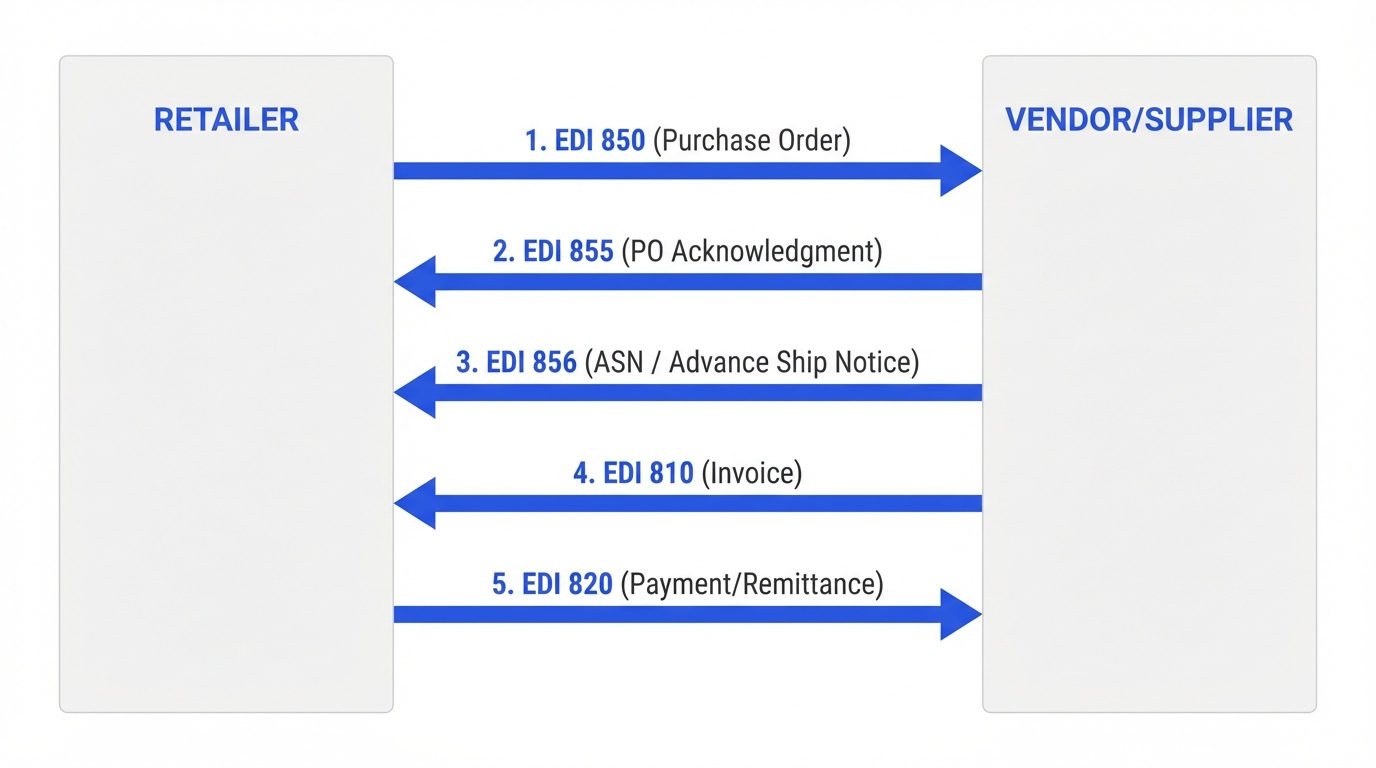
With EDI, the retailer’s system sends a purchase order (EDI 850) directly to your system. Your system acknowledges it (EDI 855), generates the shipping notice when the order ships (EDI 856), and transmits the invoice (EDI 810), all automatically, with no manual data entry. This eliminates transcription errors, speeds up the order-to-cash cycle, and is exactly what retailers mean when they say “EDI capable.”
The EDI Transaction Sets Every Retail Vendor Needs to Know
EDI documents are called transaction sets, and each one has a three-digit number. Think of them as standardized digital forms. Every EDI 850 follows the same structure no matter which retailer sends it, which is what makes automated processing possible. Here are the transaction sets you’ll encounter as a retail vendor:
| Transaction Set | Name | Who Sends It | What It Does |
|---|---|---|---|
| 850 | Purchase Order | Retailer → Vendor | The retailer sends you an order specifying items, quantities, prices, and ship-to location. |
| 855 | PO Acknowledgment | Vendor → Retailer | You confirm receipt of the order and indicate which line items you can fulfill. |
| 856 | Advance Ship Notice (ASN) | Vendor → Retailer | You notify the retailer what’s on the truck: items, cartons, SSCC codes, tracking info. |
| 810 | Invoice | Vendor → Retailer | You send an electronic invoice after shipment. Must match the 850 and 856. |
| 820 | Payment Order / Remittance | Retailer → Vendor | The retailer sends payment details, including deductions and adjustments. |
| 860 | PO Change Request | Retailer → Vendor | The retailer modifies an existing order, changing quantities, dates, or adding items. |
| 846 | Inventory Inquiry/Advice | Either direction | Share inventory levels between trading partners for planning and replenishment. |
| 997 | Functional Acknowledgment | Either direction | Automated receipt confirming a transaction set was received and is syntactically valid. |
The Core Four: 850, 855, 856, 810
For most retail vendors, four transaction sets form the backbone of every order cycle:
The EDI 850 (Purchase Order) starts everything. The retailer sends you an electronic purchase order specifying what they want, how many units, the price, and where to ship it. Your system receives this and can automatically create a sales order in your ERP or inventory system.
The EDI 855 (Purchase Order Acknowledgment) is your response. It tells the retailer you received their order and confirms you can fulfill it, or flags any line items you can’t fill. Not all retailers require the 855, but it’s good practice to always send one.
The EDI 856 (Advance Ship Notice / ASN) is sent when you ship the order. It tells the retailer exactly what’s on the truck, which items, in which cartons, with which SSCC barcodes, arriving when. The ASN is the single most important EDI document for compliance because missing or late ASNs are the #1 source of retail chargebacks. Read our complete ASN guide →
The EDI 810 (Invoice) replaces your paper or emailed invoice. It’s sent after the shipment and must match the purchase order (850) and shipping notice (856) in quantities and prices. Mismatches between these three documents are a common source of payment delays and deductions.
Additional Transaction Sets
Beyond the core four, you may encounter the EDI 820 (Payment Order/Remittance Advice), which the retailer sends when they pay you, detailing which invoices are being paid and any deductions. The EDI 860 (Purchase Order Change) is sent by the retailer to modify an existing order, changing quantities, adding items, or adjusting ship dates. The EDI 846 (Inventory Inquiry/Advice) shares inventory availability between trading partners, and the EDI 997 (Functional Acknowledgment) is an automated receipt confirming your system received an EDI transmission.
Which Retailers Require EDI?
Nearly every major US retailer requires EDI from their vendors. The specific transaction sets, portals, and timelines vary, but the expectation is universal: if you want to sell to big retailers, you need EDI capabilities.
| Retailer | EDI Required? | Portal / Platform | Key Transaction Sets | Notes |
|---|---|---|---|---|
| Walmart | Yes | Retail Link | 850, 855, 856, 810, 997 | Mandatory for all suppliers. Uses AS2 for direct connections. ASN required before receiving. |
| Target | Yes | Partners Online | 850, 855, 856, 810 | EDI required for domestic vendors. Strict ASN timing requirements. |
| Amazon | Yes | Vendor Central / SP-API | 850, 855, 856, 810 (or API) | Supports both traditional EDI and API-based integration via Vendor Central. |
| Costco | Yes | Vendor Hub | 850, 856, 810 | Required for direct vendors. EDI testing/certification via SPS Commerce required before go-live. |
| Kroger | Yes | Webgate+ | 850, 855, 856, 810 | Required via Webgate+ portal. Vendors must complete EDI onboarding with approved VAN. |
| Home Depot | Yes | Home Depot Supplier Hub | 850, 855, 856, 810, 860 | Required for domestic suppliers. Includes PO change (860) in standard set. |
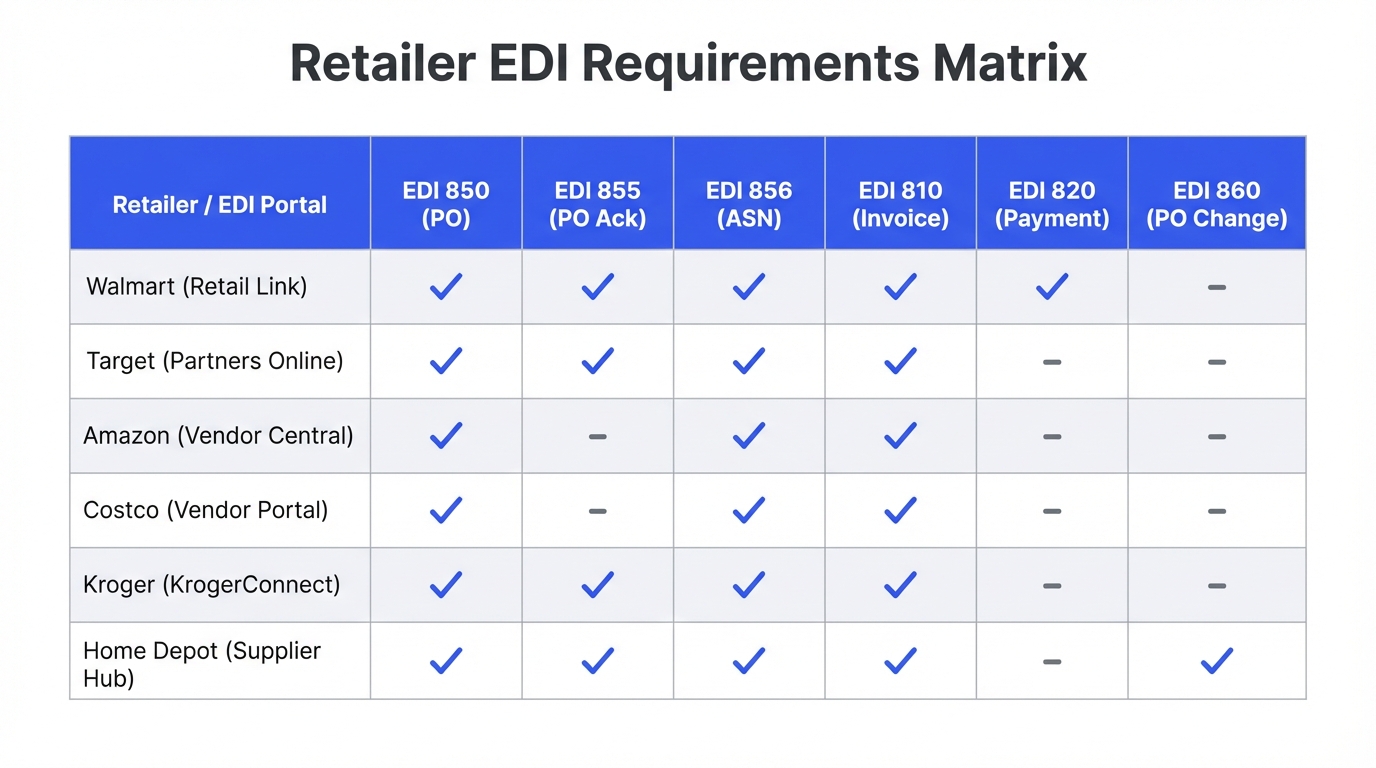
The retailer requirements listed above are based on publicly available vendor onboarding documentation. Specific requirements may vary by product category, vendor tier, or agreement terms. Always confirm directly with your retail buyer during onboarding.
What Happens If You Don’t Have EDI
The consequences of not having EDI, or having a poorly implemented EDI setup, are financial and operational. Here’s what vendors face:
Chargebacks for missing or late ASNs
The EDI 856 (ASN) is where most first-time vendors get hit. Missing an ASN or sending it late triggers chargebacks of $200–$2,000+ per shipment depending on the retailer. Walmart issues chargebacks for missing or invalid ASNs, and shipments without valid ASNs face significant receiving delays and compliance penalties. Learn about retail chargebacks →
Payment delays from invoice mismatches
When your EDI 810 invoice doesn’t match the purchase order quantities or prices, retailers put the payment on hold until the discrepancy is resolved. On net-60 or net-90 payment terms, a hold can delay your payment by months.
Manual entry errors compound
Without EDI automation, every purchase order must be manually keyed into your system. Industry research suggests manual order entry has an error rate of 1–3%, and each error creates downstream problems: wrong items shipped, incorrect quantities, mismatched invoices.
Vendor scorecard impact
Retailers track EDI compliance as part of vendor performance scoring. Consistent EDI failures lower your scorecard, which can result in reduced shelf space, lost promotional opportunities, or being dropped as a vendor entirely. How vendor scorecards work →
EDI in Practice: What a Retail Order Actually Looks Like
To understand how EDI works in the real world, let’s walk through a complete order cycle between a vendor and Target. This example shows every EDI touchpoint from purchase order to payment.
Scenario: Target Orders 500 Units of Your Product
Monday 9 AM: Target sends EDI 850 Purchase Order
Target’s system automatically generates a purchase order for 500 units of your product, shipping to their Dallas distribution center. The EDI 850 includes the Target item number (DPCI), your GTIN, unit price, requested ship date, and delivery window. Your EDI system receives it and creates a sales order in your ERP automatically.
Monday 10 AM: You send EDI 855 PO Acknowledgment
Your system automatically responds with an EDI 855 confirming you can fulfill all 500 units. If you could only ship 400, the 855 would flag the 100-unit shortfall so Target can adjust their planning. This step prevents surprises at receiving.
Wednesday: Your warehouse picks, packs, and labels the order
Your team picks the 500 units, packs them into 25 master cartons (20 units each), builds 2 pallets, and applies GS1-128 SSCC labels to each carton and pallet. Each label has a unique 18-digit Serial Shipping Container Code that will be referenced in the ASN.
Wednesday afternoon: You send EDI 856 Advance Ship Notice
As the truck leaves your dock, your WMS transmits the EDI 856 to Target. It details every carton: which items are in each box, the SSCC barcode on each carton, the total quantity per SKU, the carrier name, tracking number, and estimated arrival. Target’s DC uses this to pre-plan dock scheduling and labor allocation. This must arrive before the trailer reaches their yard.
Friday: Target receives the shipment
At the DC, workers scan each carton’s SSCC barcode. The system matches each scan against the ASN data. If 25 cartons were listed in the 856 and 25 barcodes scan successfully, receiving is complete in minutes. Without the ASN, each carton would need to be opened and manually counted.
Friday afternoon: You send EDI 810 Invoice
After shipment confirmation, your system sends the electronic invoice. The 810 references the original PO number (from the 850), lists the exact quantities shipped (matching the 856), and the agreed prices. Target’s accounts payable system runs a three-way match: 850 vs. 856 vs. 810. If all three align, the invoice is approved for payment.
60 days later: Target sends EDI 820 Payment/Remittance
On net-60 terms, Target’s system sends a payment remittance detailing which invoices are being paid, minus any deductions for compliance issues. If everything was clean, you receive the full amount. If there were chargebacks (late ASN, labeling errors), they’re deducted here.
This entire cycle, from purchase order to payment, happens electronically with minimal human intervention when EDI is properly configured. The key insight for new vendors is that every step is connected: errors in the 856 ASN cascade into receiving problems, which cause 810 invoice mismatches, which delay 820 payment. Getting the data right at each step is what EDI compliance is all about.
Stop guessing, start knowing
Not sure what EDI setup your retailer requires?
RetailerHub’s Compliance IQ lets you ask any compliance question and get instant answers, including which EDI transaction sets, label formats, and ASN timing rules each retailer expects.
EDI for Small Business: Your Options
The single biggest concern for small businesses entering retail is EDI cost. The good news is that you have several options, and the right choice depends on your order volume and technical infrastructure.
Web-Based EDI Portal
$50–$200/moYou log into a web interface and manually enter or view EDI transactions through your browser. The provider handles the technical EDI translation and VAN connectivity behind the scenes. No software to install, no integration with your systems.
Integrated EDI Solution
$200–$500/moEDI software connects directly to your ERP, inventory management, or e-commerce platform (Shopify, NetSuite, QuickBooks, etc.). Purchase orders flow in automatically, and ASNs and invoices are generated from your system data without manual entry.
Full-Service EDI Provider
$500–$1,000+/moA dedicated EDI provider like SPS Commerce or TrueCommerce manages your entire EDI operation. They handle setup, testing, mapping, monitoring, and troubleshooting. You get a team of EDI specialists on call.
3PL-Managed EDI
Included in 3PL feesIf you use a third-party logistics provider for fulfillment, many 3PLs handle EDI on your behalf as part of their service. Their warehouse management system generates ASNs, transmits shipping notices, and manages the technical integration with each retailer.
How to Choose the Right EDI Solution
The decision typically comes down to volume. If you’re shipping fewer than 50 orders per month to a single retailer, a web-based EDI portal is the simplest and cheapest option. You log in and manually enter transaction data through a browser interface. At 50–200 orders per month, an integrated EDI solution that connects to your ERP or inventory system eliminates manual data entry and reduces errors. Above 200 orders per month, you need full-service EDI with dedicated support.
If you’re using a third-party logistics provider (3PL), check whether they offer EDI as part of their services. Many 3PLs handle EDI on behalf of their clients at no additional cost, which can be the simplest path for small brands. Your 3PL’s warehouse management system generates the ASN, transmits the shipping notice, and handles the technical integration with each retailer’s requirements.
| Solution Type | Monthly Cost | Setup Time | Best For |
|---|---|---|---|
| Web-based EDI portal | $50–$200 | 1–2 weeks | <50 orders/month, 1–2 retail partners |
| Integrated EDI | $200–$500 | 4–6 weeks | 50–200 orders/month, ERP/inventory integration needed |
| Full-service EDI provider | $500–$1,000+ | 4–8 weeks | 200+ orders/month, multiple retail partners |
| 3PL-managed EDI | $0 extra (included) | Depends on 3PL | Brands using a 3PL for fulfillment |
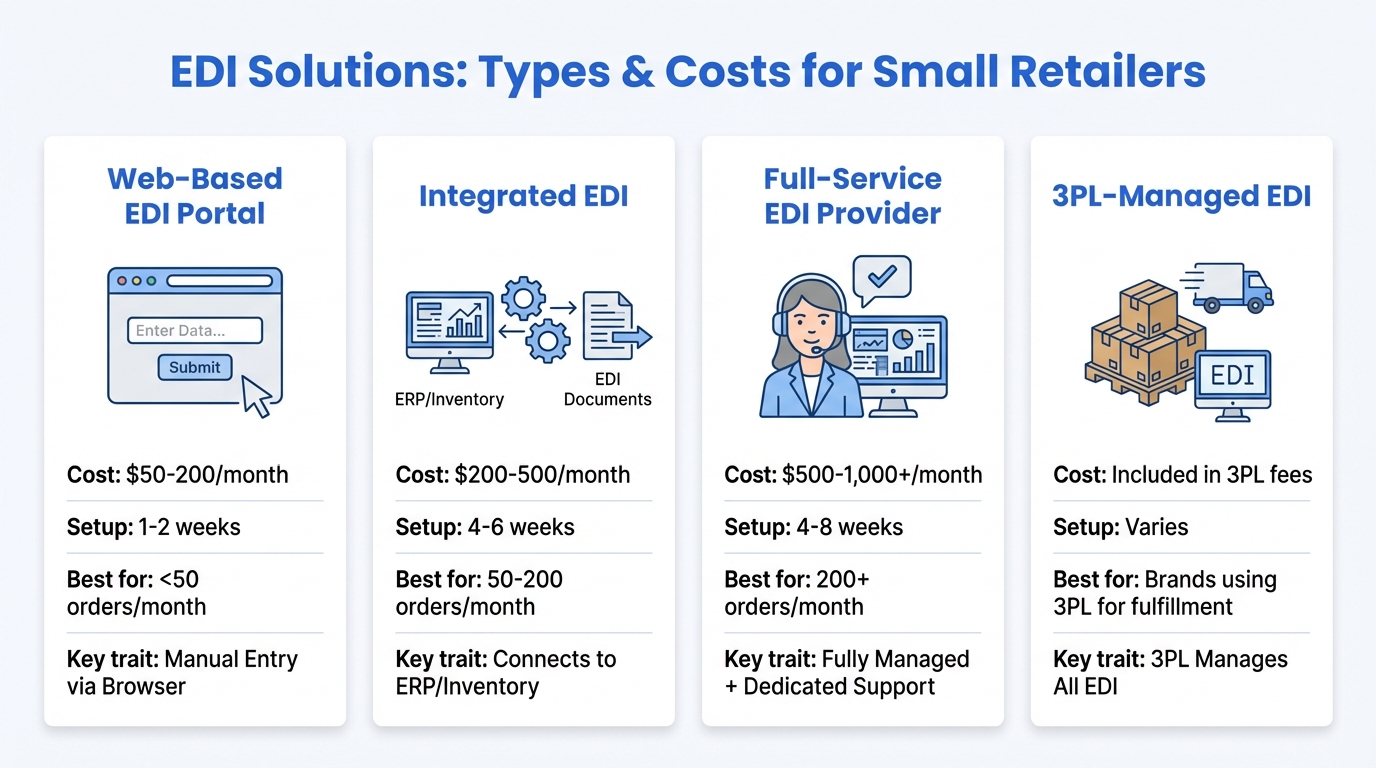
Watch for setup fees. Many EDI providers charge one-time setup fees of $500–$2,000+ per trading partner in addition to monthly costs. Ask about setup fees, per-transaction fees, and minimum commitments before signing a contract.
How to Set Up EDI: Step-by-Step
Setting up EDI typically takes 4–8 weeks from start to go-live. Here’s the process:
Get your GS1 Company Prefix
If you don’t already have one, register at gs1us.org. Your GS1 Company Prefix is required for UPC barcodes (GTINs) and SSCC shipping container codes, both of which are referenced in EDI transactions. Processing typically takes 1–5 business days.
Choose an EDI provider or solution
Based on your volume and technical needs, select a web-based portal, integrated solution, or full-service provider. Get quotes from 2–3 providers and compare setup fees, monthly costs, per-transaction fees, and supported retailers.
Exchange trading partner information
Your EDI provider will need the retailer’s EDI specifications (called a “trading partner profile” or “implementation guide”). This includes their VAN ID, qualifier codes, and specific data requirements. Your retail buyer or the retailer’s vendor onboarding team provides this.
Map your product data
Your item numbers (GTINs), descriptions, unit of measure codes, and pricing must match what the retailer has in their system. This mapping step ensures that when the retailer sends an 850 with their item number, your system knows exactly which product they mean.
Test EDI transactions
Every retailer requires a testing phase before you go live. You’ll exchange test transactions (850, 855, 856, 810) and verify that data flows correctly in both directions. Some retailers, like Costco, have a formal certification process. Others simply review test files and approve you.
Go live and monitor
Once testing passes, you’re approved for live transactions. Monitor closely for the first 2–4 weeks. Watch for rejected transactions, acknowledgment failures (997 errors), and data mismatches. Most EDI providers offer dashboards that flag errors in real time.
What to Expect During EDI Testing
EDI testing (sometimes called “certification”) is where most delays happen. The retailer sends you test purchase orders, and you respond with test acknowledgments, ASNs, and invoices. Their system validates every field: are your item numbers correct? Are the quantities in the right format? Is the SSCC structure valid? Does your invoice reference the correct PO number?
Expect to go through multiple rounds of testing. Your first submission will almost certainly have errors: a missing segment, an incorrect qualifier code, a data element in the wrong position. This is normal. Your EDI provider should handle the technical debugging, but you’ll need to provide business data: your GS1 Company Prefix, item numbers, prices, and product descriptions.
Some retailers are more rigorous than others. Costco, for example, requires formal certification through SPS Commerce before go-live. Walmart allows vendor self-testing through Retail Link. Target reviews test files and approves vendors individually. Ask your retail buyer or vendor onboarding contact what their specific testing process looks like.
Timeline tip: Start EDI setup as soon as you sign the vendor agreement, not when you receive your first purchase order. Many new vendors underestimate the setup time and end up scrambling to get EDI working before their first PO arrives.
Your GS1 Company Prefix is required for EDI because it’s the foundation for your product identification (GTINs/UPCs) and shipping container codes (SSCCs). If you don’t already have one, register at gs1us.org. Learn about GS1-128 labels and SSCC codes →
EDI Compliance: What Retailers Actually Check
Having EDI set up is only half the battle. You also need to keep your EDI transactions compliant. Retailers actively monitor EDI quality and issue chargebacks or scorecard deductions when vendors fall short.
What Gets Checked
ASN accuracy and timing
The EDI 856 must be transmitted before the shipment arrives. Carton contents, quantities, SSCC codes, and PO references must exactly match what’s physically on the truck. ASN errors are the number one source of EDI-related chargebacks.
Invoice matching (three-way match)
Retailers compare the purchase order (850), shipping notice (856), and invoice (810). Quantities and prices must align across all three. A mismatch on any line item triggers a hold or automatic deduction.
Timing requirements
Each retailer has specific windows for when each transaction set must be sent. For example, Walmart expects the ASN before arrival and gives vendors 12 hours to fix errors. Target requires the ASN before the trailer arrives in the yard.
Data quality
Item numbers (GTINs), descriptions, and unit of measure codes must match the retailer’s item master database. Mismatched item data causes receiving rejections even if the physical product is correct.
The Three-Way Match: How Retailers Catch Errors
The three-way match is the foundation of retail EDI compliance. When your invoice (810) arrives, the retailer’s system automatically compares it against the original purchase order (850) and the shipping notice (856). All three documents must agree on quantities, item numbers, and prices.
For example, if the 850 ordered 500 units, the 856 reported 500 units shipped, but the 810 invoices for 520 units, the mismatch flags the invoice for review. The retailer will either reject the invoice entirely or pay for 500 units and deduct the remaining 20. Either way, the error creates work for your accounts receivable team and delays payment.
The most dangerous mismatches are between the 856 ASN and physical shipment. If your ASN says a carton contains 20 units of product A but it actually contains 18 units of product A and 2 units of product B, the retailer’s automated receiving system will flag the discrepancy. The result is chargebacks, manual recounts at the DC, and a hit to your vendor scorecard. This is why your ASN data must be generated from the same system that prints your shipping labels, never from a separate manual process.
RetailerHub’s Compliance IQ catches EDI compliance errors before they become chargebacks. Ask any question about retailer-specific EDI requirements and get instant answers.
EDI vs. API: The Modern Alternative
If EDI feels like legacy technology, you’re not entirely wrong. EDI has been around since the 1970s, and modern APIs (Application Programming Interfaces) offer a more flexible, real-time alternative. But in retail, EDI isn’t going anywhere soon.
| Feature | Traditional EDI | API-Based Integration |
|---|---|---|
| Data format | Fixed-position or delimited text (ANSI X12) | JSON or XML |
| Communication | Batch processing via VAN or AS2 | Real-time HTTP requests |
| Setup complexity | High (mapping, testing, VAN setup) | Moderate (API keys, webhooks) |
| Cost | $50–$1,000+/month + per-transaction fees | Usually included in platform fees |
| Speed | Near real-time to batched (minutes to hours) | Real-time (milliseconds) |
| Flexibility | Rigid structure, changes require remapping | Flexible, easier to modify |
| Retail adoption | Universal, required by all major retailers | Growing: Amazon, some newer platforms |
| Error handling | 997 functional acknowledgments | HTTP status codes, webhooks |
Amazon Vendor Central is the most prominent example of API-based integration in retail. Instead of traditional EDI, Amazon uses its own API layer that vendors interact with through the Vendor Central web portal or programmatically via the SP-API (Selling Partner API). However, Amazon still supports traditional EDI for vendors who prefer it.
The reality for most retail vendors in 2026 is that you’ll need traditional EDI for Walmart, Target, Kroger, and most other brick-and-mortar retailers, even if you use API-based integration for Amazon. Modern EDI providers like SPS Commerce and TrueCommerce bridge this gap by offering both EDI and API connectivity through a single platform.
Some industry observers expect a gradual shift toward API-based integration over the next decade, but the installed base of EDI systems is massive. Retailers have decades of infrastructure built around EDI, and switching costs are high. For the foreseeable future, retail vendors need to be EDI capable.
Common EDI Mistakes First-Time Vendors Make
After working with hundreds of retail vendors, these are the EDI mistakes we see most often, especially from D2C brands entering retail for the first time:
1. Starting EDI setup too late
EDI takes 4–8 weeks to set up and test. Many first-time vendors wait until they receive their first purchase order to start, then scramble to get EDI working while the retailer’s delivery window is ticking. Start EDI setup the day you sign the vendor agreement.
2. Choosing the cheapest provider
The cheapest EDI provider often means minimal support and slower issue resolution. When your ASN fails at 2 AM before a critical Walmart delivery, you need a provider who answers the phone. One chargeback from a failed ASN can cost more than months of premium EDI service.
3. Not testing thoroughly before go-live
Some vendors rush through EDI testing to meet deadlines. Test every transaction type, not just the purchase order. Test error scenarios: what happens when an item is backordered? When quantities change? When a shipment splits across two trailers? These edge cases are where mistakes happen in production.
4. Ignoring ASN requirements
The EDI 856 (ASN) is the most compliance-sensitive transaction set. Many vendors set up EDI for purchase orders and invoices but treat the ASN as an afterthought. This is backwards. The ASN is where most chargebacks come from. Get your ASN process right first.
5. Not mapping item numbers correctly
Your internal SKU is not the same as the retailer’s item number or your GTIN. Each retailer may use different item identifiers (Walmart item number, Target DPCI, Amazon ASIN). Your EDI system must correctly map between your identifiers and theirs. A single digit wrong means a rejected transaction.
6. Treating EDI as a one-time setup
Retailers update their EDI requirements periodically: new data fields, changed timing windows, additional transaction sets. Your EDI setup needs ongoing monitoring and maintenance. Subscribe to your retailer’s vendor communication channels and keep your EDI provider informed of changes.
How EDI Works: VANs, Standards, and Connectivity
Understanding the technical layer of EDI helps you evaluate providers and troubleshoot issues. You don’t need to become an EDI expert, but knowing these concepts will make conversations with your EDI provider and retail partners more productive.
Value Added Networks (VANs)
A VAN (Value Added Network) is a private network that acts as a secure middleman between trading partners. Think of it like a postal service for EDI documents. Your system sends the document to the VAN, and the VAN routes it to the retailer’s system. VANs handle encryption, delivery confirmation, and format translation between different systems.
Major VANs include SPS Commerce, OpenText (formerly GXS), IBM Sterling, and TrueCommerce. Most EDI providers include VAN connectivity as part of their service. You don’t typically need to set up a separate VAN relationship.
EDI Standards
The most common EDI standards are:
- ANSI X12: The dominant standard in North American retail. Maintained by ASC X12. All the three-digit transaction set numbers (850, 856, 810) come from this standard.
- EDIFACT: The UN/EDIFACT standard used primarily in Europe and international trade. The EDIFACT equivalent of an ASN is called a DESADV.
- GS1 EANCOM: A subset of EDIFACT used by GS1 for supply chain messages, common in European grocery and retail.
Connection Methods
EDI documents can be transmitted via several methods:
- VAN-to-VAN: The traditional method. Both trading partners connect to their respective VANs, which handle routing. Reliable but adds per-transaction costs.
- AS2 (Applicability Statement 2): A direct, point-to-point connection using HTTPS. Walmart popularized AS2 and requires it for direct EDI connections. Eliminates VAN fees but requires more technical setup.
- SFTP: Secure file transfer protocol. Simple to implement, used by some smaller trading partners. Less common for major retailers.
- Web EDI: Browser-based interface where you manually enter transaction data. No technical integration required, but doesn’t scale.
EDI Glossary
Quick reference for the most common EDI terminology you’ll encounter:
| Term | Definition |
|---|---|
| ANSI X12 | The American National Standards Institute standard for EDI in North America. Defines the format and structure of all EDI transaction sets (850, 856, 810, etc.). |
| AS2 | Applicability Statement 2. A secure, point-to-point protocol for transmitting EDI documents over HTTPS. Required by Walmart for direct EDI connections. |
| ASN | Advance Ship Notice (EDI 856). An electronic notification sent before a shipment arrives, detailing contents, packaging, and tracking information. |
| EDI Mapping | The process of translating data between your internal system format and the EDI standard format required by your trading partner. |
| EDIFACT | United Nations Electronic Data Interchange for Administration, Commerce and Transport. The international EDI standard, primarily used in Europe. |
| Envelope | The ISA/IEA (interchange) and GS/GE (functional group) segments that wrap EDI transaction sets, containing sender/receiver IDs and control numbers. |
| Functional Acknowledgment (997) | An automated response confirming that an EDI transmission was received and is syntactically valid. Does not confirm business acceptance of the content. |
| GTIN | Global Trade Item Number. The unique product identifier (UPC/EAN) encoded in barcodes and referenced in EDI transactions. |
| ISA Segment | The Interchange Control Header, the first segment in any EDI transmission. Contains sender/receiver qualifier codes and interchange control number. |
| Qualifier | A code that identifies the type of identifier used in the ISA segment (e.g., “01” = DUNS number, “12” = phone number, “ZZ” = mutually defined). |
| SSCC | Serial Shipping Container Code. A unique 18-digit identifier for cartons and pallets, encoded in GS1-128 barcodes and referenced in EDI 856 ASN data. |
| Trading Partner | Any business entity you exchange EDI documents with, typically the retailer or their designated EDI intermediary. |
| Transaction Set | A specific EDI document type identified by a three-digit number (e.g., 850 = Purchase Order, 856 = ASN, 810 = Invoice). |
| VAN | Value Added Network. A private network that routes EDI documents between trading partners, handling encryption, delivery confirmation, and format translation. |
| Web EDI | A browser-based interface for entering and viewing EDI transactions manually, without system-to-system integration. |
Frequently Asked Questions About EDI
EDI doesn’t have to be terrifying
Brands and 3PLs use RetailerHub to instantly answer any retailer compliance question, generate warehouse-ready SOPs, and get alerted when requirements change. Built by a former ShipBob Lead WMS Engineer with 10+ years in fulfillment.
Related Guides
What is an ASN?
Complete guide to advance shipment notifications, EDI 856, and SSCC labels.
Labeling & BarcodesGS1-128 Shipping Labels
Everything about GS1-128 barcodes, SSCC-18, and retailer label requirements.
Vendor PerformanceRetail Chargebacks
What they are, why they happen, and proven strategies to prevent them.